> For the complete documentation index, see [llms.txt](https://help.runonrufus.com/llms.txt). Markdown versions of documentation pages are available by appending `.md` to page URLs; this page is available as [Markdown](https://help.runonrufus.com/rufus-race-manager/team-cups/teams-overview-widget.md).
# Teams Overview Widget
The **Teams Overview widget** is the central component for managing and understanding team participation within a **Team Cup**. It provides a clear, step-by-step view of how teams are detected, validated, and ultimately classified in the cup.
The widget is divided into **three tabs** that reflect the lifecycle of teams inside a Team Cup:
* Available
* Eligible
* Classified
Each tab answers a specific question:
* *Which teams exist?*
* *Which teams meet the rules?*
* Which teams are scoring?
## Available Teams
Available Teams of the Team Cup
#### Purpose
The **Available** tab shows **all teams detected** from the races associated with the Team Cup, regardless of whether they meet the cup rules.
This is the entry point of the team evaluation process.
#### What You See
For each detected team, a card displays:
* Team name
* Total number of members
* Gender distribution (male / female icons)
At this stage:
* No eligibility rules are applied
* No scoring is calculated
#### Team Composition Dialog
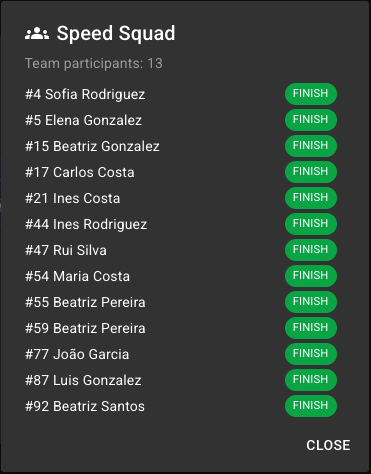
Clicking on a team card in the **Available** or **Eligible** tabs, opens a **team composition dialog**, showing:
* Full list of team participants
* Bib number and athlete name
* Finish status for each participant
This view helps you:
* Verify team membership
* Understand why a team may or may not become eligible
Team Composition Dialog
## Eligible Teams
Eligible Teams of the Team Cup
#### Purpose
The **Eligible** tab shows teams that **meet all Team Cup rules**, including:
* Team composition rules
* Minimum and maximum roster size
* Gender requirements
* Age restrictions (if enabled)
Only eligible teams can move on to classification.
You can exclude manually any eligible team by toggling the upper right swtich control of each team box.
#### What You See
Teams that meet all rules are highlighted as eligible.\
Teams that fail one or more rules appear separately as **not eligible**, clearly marked with a warning indicator.
This makes it easy to immediately identify:
* Which teams qualify
* Which teams are excluded, and why
## Classified Teams
Classified Teams of the Team Cup
#### Purpose
The **Classified** tab shows teams that are **actively contributing to the Team Cup results**.
Only teams in this tab:
* Receive a final score or time
* Appear in the Team Cup rankings
#### What You See
Teams are visually separated into two states:
* **Teams scoring in the cup**\
These teams have enough valid finishers and meet all scoring requirements.
* **Classified but not scoring yet**\
These teams are eligible but currently lack sufficient completed results to produce a score.
This distinction is especially useful during live events.
#### Team Contribution Dialog
Clicking on a team card in the **Classified** tab opens the **team contribution dialog**.
This dialog shows:
* The race contributing to the Team Cup
* Each scoring athlete
* Individual rank, time, or points
* Which athletes count toward the team result
This view provides **full transparency** into how the team’s final score or time is calculated.
Team Contribution Dialog
## Reports
The **Teams Overview widget** allows you to generate **PDF reports** directly from each of its tabs. These reports reflect the exact data and state currently displayed in the widget, making them ideal for sharing, validation, and official documentation.
Reports are generated using the **Export** action available in the widget.
## How the Widget Updates
The Teams Overview widget is fully dynamic:
* Team status updates automatically as results arrive
* Eligibility is recalculated if participant data changes
* Scoring updates instantly based on the Team Cup configuration
No manual refresh or recalculation is required.
## Why the Teams Overview Widget Matters
This widget allows race organizers to:
* Understand team eligibility at a glance
* Diagnose why teams are excluded
* Validate scoring logic
* Explain results clearly to clubs and participants
It acts as both a **management tool** and a **verification tool** for team-based competitions.