> For the complete documentation index, see [llms.txt](https://help.runonrufus.com/llms.txt). Markdown versions of documentation pages are available by appending `.md` to page URLs; this page is available as [Markdown](https://help.runonrufus.com/rufus-race-manager/team-cups/creating-a-team-cup.md).
# Creating a Team Cup
This article explains how to create and configure a **Team Cup** in RUFUS Race Manager (RRM). A Team Cup defines how teams are formed, which participants qualify, and how team results are calculated across one or more races.
## General Settings
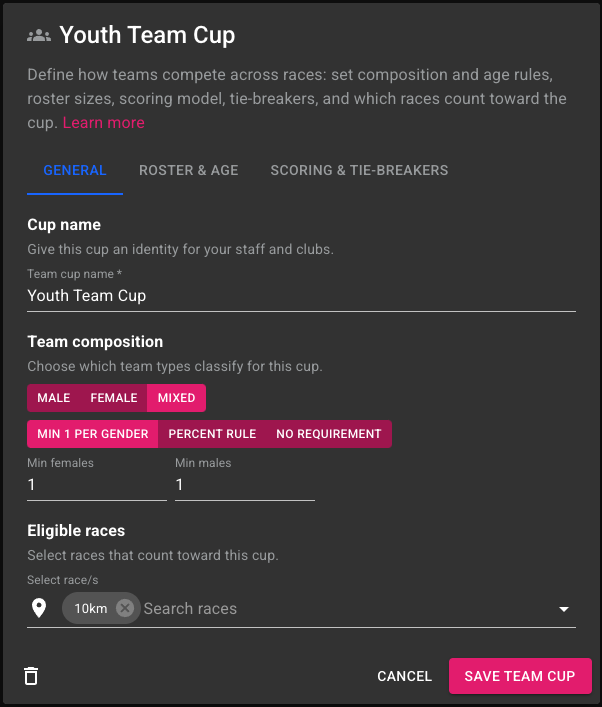
Team Cup General Settings
### Cup Name
The **Cup name** identifies the Team Cup in the interface and results. It should clearly describe the competition, such as:
* Club Championship
* Mixed Teams Cup
* Youth Team Ranking
This name is visible to staff and appears in exports.
### Team Composition
Team composition defines **which team types can compete**:
* Male teams
* Female teams
* Mixed teams
For mixed teams, you can apply additional constraints:
* Minimum athletes per gender
* Percentage-based gender balance
* No gender requirement
These rules ensure fair participation according to the competition format.
### Eligible Races
A Team Cup can include **one or multiple races**. Only participants from the selected races are considered when forming teams and calculating results.
This makes Team Cups suitable for:
* Single-race team competitions
* Multi-race or league-style cups
## Roster & Age Rules
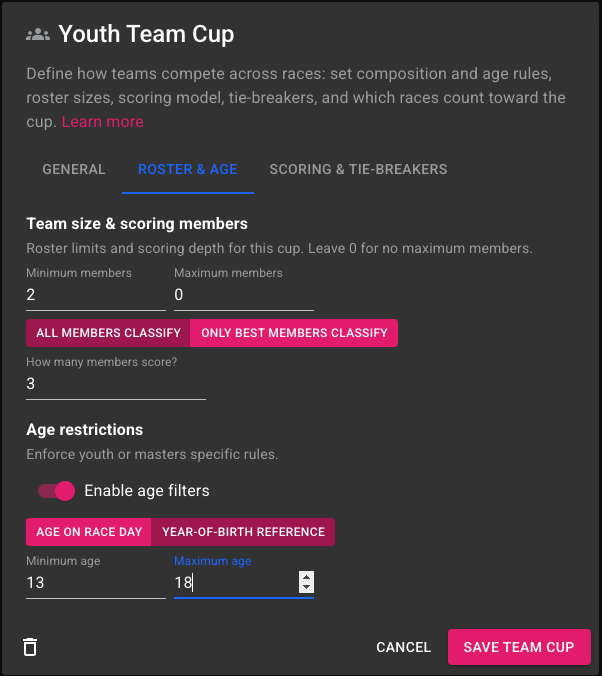
Rooster and Age Rules for the Team Cup
### Team Size and Scoring Members
In this section, you define:
* Minimum number of members required per team
* Maximum number of members allowed
* How many members contribute to the final score
You can choose between:
* **All members classify** – every athlete contributes
* **Only best members classify** – only the top-performing athletes are counted
This allows formats such as “best 3 athletes per team” while still allowing larger rosters.
### Age Restrictions
Age filters can be enabled to enforce:
* Youth-only team competitions
* Masters or veterans team cups
Only participants matching the age criteria will be considered when forming teams.
## Scoring & Tie-Breakers
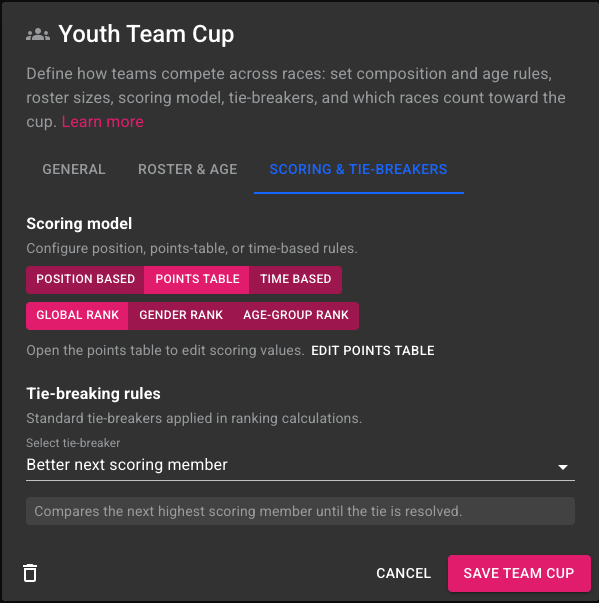
Scoring & Tie-Breakers rules for the Team Cup
### Scoring Model
RRM supports multiple scoring models for Team Cups:
* **Position-based** scoring
* **Points table** scoring
* **Time-based** scoring
Scoring can be calculated using:
* Global ranking
* Gender ranking
* Age-group ranking
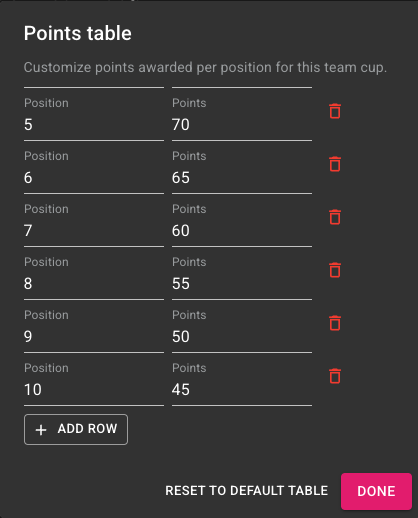
The selected model determines how individual performances contribute to the team result. If **Points table** scoring is selected, you can edit the ranking points by clicking in the **EDIT POINTS TABLE** button.
Table Points Edit Dialog
### Tie-Breaking Rules
When two or more teams finish with the same score or time, RUFUS Race Manager applies a **tie-breaking rule** to determine their final order. Tie-breakers are evaluated automatically during ranking calculation.
The following options are available:
#### None
No tie-breaker is applied.\
If teams remain tied after scoring, they will share the same rank.
#### Best Individual Position
The team with the **best single individual result** (highest position achieved by any team member) is ranked higher.
This option prioritizes standout performances within a team.
#### Better Next Scoring Member
Teams are compared by evaluating their **next best scoring member**, starting from the highest contributor and progressing down the roster until the tie is resolved.
This is a common and fair approach for team classifications where multiple members contribute to the result.
#### Highest Number of Finishers
The team with the **greater number of classified finishers** is ranked higher.
This option rewards teams with stronger participation and depth.
#### Lowest Total Time of Best Members
The team with the **lowest combined time** of its scoring members is ranked higher.
This is especially useful for time-based Team Cups where consistency across top athletes matters.
#### Head-to-Head Comparison
Teams are compared based on **direct performance against each other** within the same races.
This option is useful in league-style or recurring competitions where teams face each other multiple times.
#### How Tie-Breakers Are Applied
* Tie-breakers are applied **only when teams are tied**
* The selected rule is evaluated automatically
* Rankings update dynamically if results change
Choosing the appropriate tie-breaker ensures transparent and predictable team rankings aligned with your competition rules.
## Example: Youth Mixed Team Cup
Below is an example of a typical Team Cup configuration.
#### Scenario
An event organizer wants to create a **Youth Mixed Team Cup** for a 10 km race.
#### Configuration
* **Team composition**: Mixed teams
* **Gender rule**: Minimum 1 male and 1 female per team
* **Team size**:
* Minimum members: 2
* Maximum members: 6
* **Scoring members**: Best 3 athletes per team
* **Age restriction**: Youth category only
* **Scoring model**: Time-based
* **Scoring method**: Average time of scoring members
#### Result
* Teams are detected automatically from race participants data
* Only teams meeting gender and age rules become eligible
* Each team’s final time is calculated as the average of its best three athletes
* Teams are ranked from fastest to slowest
This setup produces a clear, fair, and easily explainable team classification.