> For the complete documentation index, see [llms.txt](https://help.runonrufus.com/llms.txt). Markdown versions of documentation pages are available by appending `.md` to page URLs; this page is available as [Markdown](https://help.runonrufus.com/rufus-race-manager/team-cups/team-cup-dashboard.md).
# Team Cup Dashboard
The **Team Cup Dashboard** is the main workspace for viewing, managing, and validating a specific **Team Cup** in RUFUS Race Manager (RRM). It brings together team eligibility, scoring configuration, live rankings, and reporting in a single view.
Each Team Cup has its own panel, accessible from the **Team Cups Menu**.
Team Cup Dashboard
### Panel Overview
At a glance, the Team Cup Panel provides:
* A summary of the Team Cup configuration
* The **Teams Overview widget**
* The **results grid** with final team rankings
* Export and reporting tools
All data displayed in the panel updates dynamically as race results and participant data change.
### Team Cup Header
At the top of the panel, the header displays key information about the Team Cup:
* **Team Cup name**
* Races contributing to the cup
* Team composition type (male, female, or mixed)
* Scoring rule (for example, best N members)
* Scoring model (points table, time-based, or position-based)
These indicators provide immediate context for understanding how the rankings are calculated.
### Teams Overview Widget
The [**Teams Overview widget**](/rufus-race-manager/team-cups/teams-overview-widget.md) occupies the upper section of the panel and is used to track teams through their lifecycle in the Team Cup.
It is divided into three tabs:
* **Available** – teams detected in the selected races
* **Eligible** – teams that meet all cup rules
* **Classified** – teams contributing to the final results
From this widget, you can:
* Inspect team composition
* Identify why teams are not eligible
* Review which teams are scoring
* Generate PDF reports for each tab
(See *Teams Overview Widget* for a detailed explanation.)
### Results Grid
The **Results Grid** displays the final Team Cup classification.
#### What the Grid Shows
For each classified team, the grid includes:
* Team rank
* Team name
* Final score or time
The grid reflects the scoring model and tie-breaking rules defined in the Team Cup configuration.
#### Sorting and Search
The Results Grid supports:
* Sorting by columns
* Searching teams by name
This makes it easy to locate specific teams in large competitions.
### Exporting Results
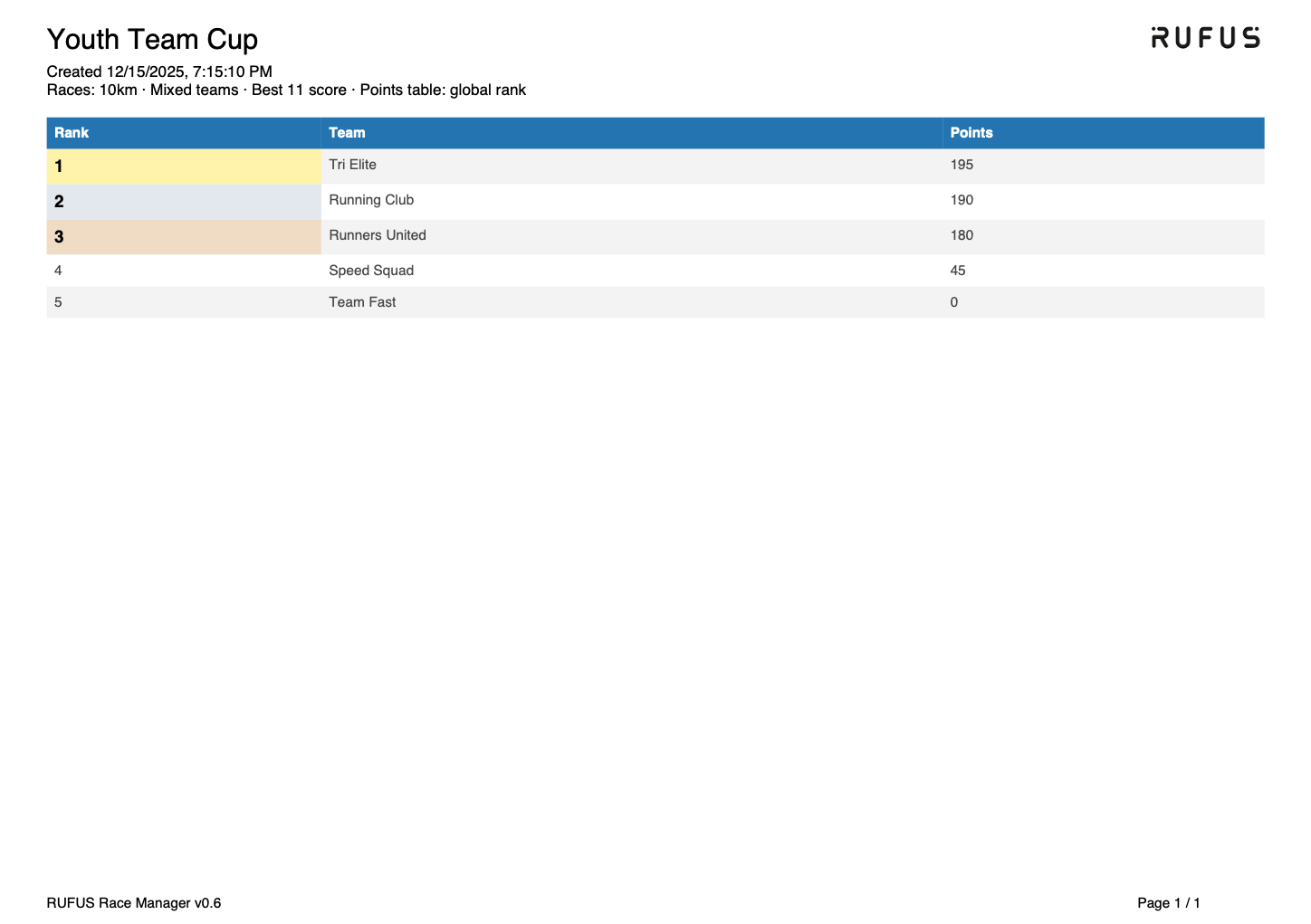
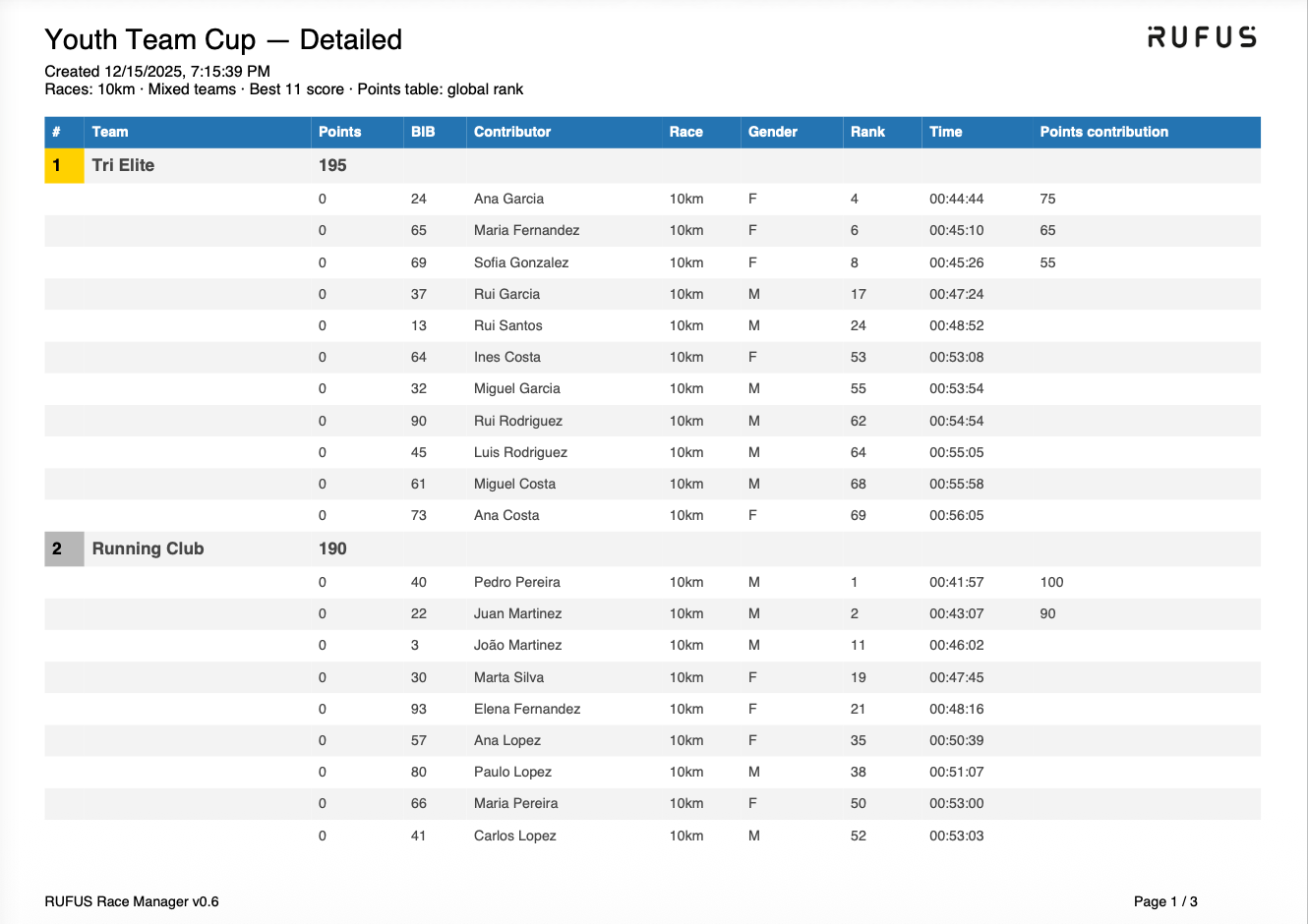
The **Team Cup Panel** allows you to export Team Cup results as **PDF reports**. These reports are generated from the **Results Grid** and reflect the current state of the Team Cup at the moment of export.
RUFUS Race Manager provides **two types of Team Cup reports**:
* **Default (Summary) Report**
* **Detailed Report**
Both formats are suitable for official distribution and archiving.
Default (Summary) Report
Detailed Report
#### Default Report (Rankings Only)
The **Default report** provides a clean, high-level overview of the Team Cup classification.
This report includes:
* Team Cup name and creation date
* Races included in the cup
* Team composition and scoring rules
* Final team ranking
* Team name and total score or time
This format is ideal for:
* Publishing official team rankings
* Sharing concise results with participants or clubs
* Printing or posting results on notice boards
It focuses exclusively on **final standings**, without individual athlete breakdowns.
#### Detailed Report
The **Detailed report** expands the default view by including **full team composition and scoring contributions**.
In addition to the ranking information, this report shows:
* All classified teams
* Each contributing athlete per team
* Bib number and athlete name
* Race, gender, individual rank, and finish time
* Points or time contribution of each athlete
* Clear grouping of athletes under their respective teams
This format is ideal for:
* Result verification and auditing
* Explaining how team scores were calculated
* Resolving disputes or answering detailed inquiries
* Internal review and technical documentation
The detailed report provides **full transparency** into the scoring logic of the Team Cup.
#### Choosing the Right Report
* Use the **Default report** when you only need final team rankings
* Use the **Detailed report** when you need to explain or validate how results were produced
Both reports are generated directly from the same data source, ensuring consistency between on-screen results and exported documents.
### Live and Post-Race Behavior
The Team Cup Panel works seamlessly both during and after an event:
* During live races, teams may appear as **classified but not scoring yet** until enough finishers are available
* As results arrive, eligibility and scoring update automatically
* After the race, the panel represents the final official Team Cup classification
No manual recalculation is required at any stage.
### Transparency and Validation
One of the key strengths of the Team Cup Panel is transparency.
From this panel, you can:
* Trace each team’s score back to individual athletes
* Validate eligibility and scoring logic
* Clearly explain results to clubs, teams, or officials
This makes the Team Cup Panel a reliable reference for both operational use and official reporting.
### When to Use the Team Cup Panel
You’ll work in the Team Cup Panel when you need to:
* Monitor team eligibility and participation
* Validate scoring rules during an event
* Review and publish team rankings
* Export official team results
It is the central control point for all team-based competitions in RRM.