Participant Statuses, Notes, Penalties and Bonuses
The Participant Status in RUFUS Race Manager (RRM) represents the current state of a participant within a race. Status management, along with notes and penalties, allows race operators to correctly reflect race outcomes and provide additional context for participants when needed.
This article explains:
Participant status types
Automatic and manual status management
Participant notes
Penalties and bonuses applied to participants
These tools help race organizers maintain accurate classifications and transparent race records.
Participant Status Types

Participants can have one of the following statuses.
NOT_STARTED
The participant has not yet started the race.
IN_RACE
The participant has started the race but has not yet finished.
FINISH
The participant has completed the race.
DNS
Did Not Start – the participant did not start the race.
DNF
Did Not Finish – the participant started but did not finish.
DSQ
Disqualified – the participant has been disqualified.
DNQ
Did Not Qualify – the participant did not qualify for the race.
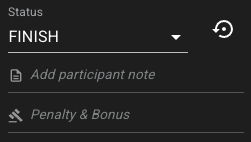
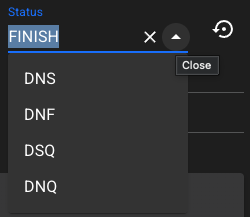
The current participant status can be seen and edited in the Edit Participant view.
System-Managed Statuses
The following statuses are automatically determined by the system based on the participant’s recorded passings.
NOT_STARTED
No passings have been recorded for the participant.
IN_RACE
One or more passings exist but the final finish passing has not yet occurred.
FINISH
A valid finish passing has been recorded (lap ID 9999).
These statuses update automatically during the race to reflect the participant’s progress.
Manually Assignable Statuses
Race operators can manually assign the following statuses when needed.
DNS
Participant did not start the race.
DNF
Participant started but did not finish.
DSQ
Participant was disqualified.
DNQ
Participant did not qualify for the race.
Manual status changes override the system-determined status until it is restored.
Restoring the Participant Status
If a participant status has been manually modified, it can be restored to the system-determined status.
Use the Restore Participant Status button next to the status selector.
This will recalculate the participant status based on the recorded passings.
Example:
If a participant was marked DNF but valid passings indicate they finished the race, restoring the status will change it back to FINISH.
Participant Notes
A Participant Note allows race operators to add contextual information to a participant.
This field can be used to record:
The reason for a disqualification
Manual decisions from race officials
Observations about race incidents
Any other race control notes
Examples:
Cut course at km 18
Manual finish verification
Incorrect bib number reported
When a note is present, a note indicator icon appears next to the participant in the participant list.
This helps race operators quickly identify participants with special notes or race decisions.
Penalties and Bonuses

RRM allows race operators to apply time penalties or bonuses to participants.
This feature is used when race rules require time adjustments due to infractions or official decisions.
Examples include:
Penalty for cutting the course
Penalty for missing a checkpoint
Bonus time adjustment granted by race officials
When a penalty or bonus is applied:
The adjustment is reflected in the participant’s result
A description of the adjustment can be recorded
The information appears in the participant editor
Typical examples:
Penalty
+120 seconds – Cut course
Bonus
−30 seconds – Official correction
Status Reasons and Race Control Context
Participant notes and penalty descriptions act as status reasons, allowing race operators to document why a decision was made.
This ensures that race classifications remain transparent and auditable.
Reasons may include:
Disqualification justification
Penalty explanations
Official race control notes
These notes provide valuable context for organizers reviewing results after the event.
Race App Integration
Participant notes and penalties can also be generated automatically by Race App actions during race operations.
For example, race judges using the Race App may:
Apply penalties
Flag participants
Send race control notes
When these actions occur, the corresponding notes and adjustments appear automatically in the participant editor in RRM.
Initial Participant Status
When participants are first added to an event, their initial status is:
NOT_STARTED
As passings are recorded during the race, the system automatically updates the status to IN_RACE or FINISH.
Summary
Participant status management in RRM combines automated race tracking with manual race control tools.
Race organizers can:
Monitor system-generated statuses
Assign manual race statuses
Add notes explaining race decisions
Apply penalties or bonuses when required
These tools ensure race results remain accurate, transparent, and fully documented.
Last updated