> For the complete documentation index, see [llms.txt](https://help.runonrufus.com/llms.txt). Markdown versions of documentation pages are available by appending `.md` to page URLs; this page is available as [Markdown](https://help.runonrufus.com/rufus-race-manager/races/time-trial-race-dashboard.md).
# Time-Trial Race Dashboard
The Time-Trial Race Dashboard in RUFUS Race Manager (RRM) provides a real-time operational view for races that run for a fixed **duration**, where the objective is to complete as many laps as possible before time expires. Unlike Fixed Laps races, the finish condition isn’t reaching a lap goal but reaching the race duration limit.
This dashboard is optimized for endurance-style loop racing such as cycling circuits, motorsport heats, MTB enduro loops, running time challenges, or any competition in which participants repeat laps for a defined period of time.
Time-Trial Race Dashboard View
## Dashboard Overview
A Time-Trial Dashboard includes:
* **Race title and timing controls**
* **Process passings switch**
* **Checkpoint and Lap Gate indicators**
* **Start time & floating passing tools**
* **Race Progress widget showing the leader’s laps**
* **Race Pause system** (exclusive to time-trial races)
* **Time-Trial race clock with over-time behavior**
* **Lap-based results table**
Time-trial dashboards focus on both *lap count* and *race duration*, presenting a hybrid view of timing and endurance performance.
## Race Controls
### Process Passings
The **Process passings** switch determines whether the dashboard actively evaluates new passings:
* **Enabled** → Lap numbering, times, and rankings update in real time
* **Disabled** → Passings are captured but marked as *RACE\_CLOSED* and do not affect results
This is useful before the race begins or after the race ends.
## Start Time Management
Just like other race types, the Time-Trial dashboard includes:
* Manual start time entry
* A **NOW** button to trigger start when the horn or flag is given
* Automatic recalculation of all race times if the start time is corrected later
Because time-trial races depend heavily on accurate timing across the full duration, RRM recalculates:
* Lap times
* Total times
* Ranking order
…whenever the start time is adjusted.
## Race Progress & Checkered Flag State
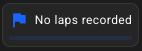
Time-trial races do **not** have a target lap goal. Instead, the Race Progress widget displays:
* **The number of laps completed by the leading participant**
* A visual progress bar showing the race activity
Laps Race Progress
This gives timekeepers immediate insight into how far the race has progressed in terms of lap performance.
#### Checkered Flag State in Time-Trial Races
When the race **duration limit is reached**, the dashboard:
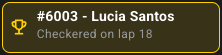
* Activates the **Checkered Flag state**
* Highlights the leader at the moment the race expired
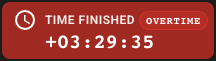
* Displays a red “**Time Finished – Overtime**” panel
Checkered Flag State
Race Time with OVERTIME
Participants may complete their ongoing lap, but no new laps can start once the race time has expired.
## Race Pause System (Exclusive to Time-Trial Races)
Time-trial races in RRM include a **Pauses widget**, which allows timers to record:
* **Red flags**
* **Safety pauses**
* **Neutralization periods**
* **Race interruptions**
When a pause begins:
* The race clock **stops**
* A **red pause badge** appears (`Active pause`)
* The pause duration is measured
* Passings remain recorded but do not advance race time
When the pause ends:
* The clock resumes
* A **blue pause entry** is logged, showing:
* Start time of pause
* End time of pause
* Total pause duration
* The pause record remains visible for audit and reporting
This ensures official elapsed race time reflects *active competition time*, excluding interruptions.
## Lap Results Table
The main body of the Time-Trial dashboard displays a detailed table of all participants and their lap performance.
Columns typically include:
* **Position**
* **BIB and Name**
* **Laps Completed**
* **Lap Time (most recent lap)**
* **Total Time**
* **Gap to leader (laps or time)**
* **Interval** (difference vs previous lap)
* **Sector splits** (S1, S2, …)
* **Position Change (POS. Δ)**
* **Lap Pace**
* **Best Lap**
#### Time-Trial Ranking Logic
Participants are ranked by:
1. **Total laps completed**
2. **Total race time** (if same lap count)
This ensures fair and consistent classification even when participants complete laps at different speeds.
## Race Clock Behavior
The Time-Trial race clock does more than count up—it manages the entire duration logic:
#### Before start
* Shows countdown if start time is in the future
#### During the race
* Counts down against the configured duration
* Pauses when an active race pause is triggered
* Resumes when the pause ends
#### After the duration expires
* Switches to **Time Finished – Overtime**
* Continues counting up how long the race is beyond the original duration
* Prevents new laps from starting
* Allows participants to complete their current lap
This reflects the real-world behavior of endurance time events.
## Checkpoints & Lap Gate
For time-trial races, the **Lap Gate** increments lap counts.\
Sector checkpoints may exist, but only the Lap Gate determines lap progression.
The dashboard displays all checkpoints with state indicators so timekeepers can see at a glance that all timing points are active.
## When to Use the Time-Trial Dashboard
This dashboard is ideal for duration-based endurance competitions such as:
* Cycling criteriums with a timed phase
* Motor sport timed heats
* Trail or road running time challenges
* MTB loop endurance races
* Adventure challenges with timed loop stages
Any race where performance is measured by *laps completed in a fixed amount of time* should use this dashboard.
## Conclusion
The Time-Trial Race Dashboard in RRM is fully optimized for duration-driven, lap-based events. With real-time lap tracking, a flexible pause system, automatic checkered-flag handling, and a detailed performance table, organizers can run complex endurance races accurately, safely, and confidently.