> For the complete documentation index, see [llms.txt](https://help.runonrufus.com/llms.txt). Markdown versions of documentation pages are available by appending `.md` to page URLs; this page is available as [Markdown](https://help.runonrufus.com/rufus-race-manager/classification-and-results-processing/viewing-race-podiums.md).
# Viewing Race Podiums
The **Podiums widget** in RUFUS Race Manager (RRM) allows race organizers to instantly view podiums as they are formed in real time during the race. This feature provides a quick, clear view of top positions across different categories and makes exporting results for awards and announcements simple and professional.
Podiums Widget
## Key Features
* **Automatic Podium Creation**:\
RRM automatically generates podiums for all major classifications:
* Global
* Age group
* Gender
* Group
* City
* Team
* Club
* Country
* **Real-Time Completion Tracking**:\
Completed podiums are marked with a green dot ✅, helping organizers quickly identify which categories are ready to be announced.
* **Configurable Top Positions**:\
Choose whether to display the **top 1 to 10** finishers. This flexibility makes it suitable for both standard award ceremonies (top 3) and extended recognition formats.
* **GAP Field**:\
The podium view shows the **GAP** between participants, making it clear how much time separated finishers in each category. This is especially useful for commentators and live announcers.
* **Interactive Navigation**:\
By **double-clicking on any participant**, you can jump directly into the **Participant View**, where you’ll see all their rankings across all categories in which they appear.
* **Exclusión Rule:**\
This option is available in the **GENDER** podiums. You can select to exclude winners on the **GENDER** podiums to be present in **AGE GROUPS** podiums
## Export Options
The podium widget includes powerful export tools designed for award ceremonies and official documentation. Available options:
Export Options
* **Current Podium Only (PDF)**: Export just the podium you are currently viewing (e.g., “Age group Master AH podium only”).
* **All Podiums**: Export every podium for the selected classification type.
* **Only Completed Podiums**: Export only podiums that have been fully filled (e.g., top 3 exists).
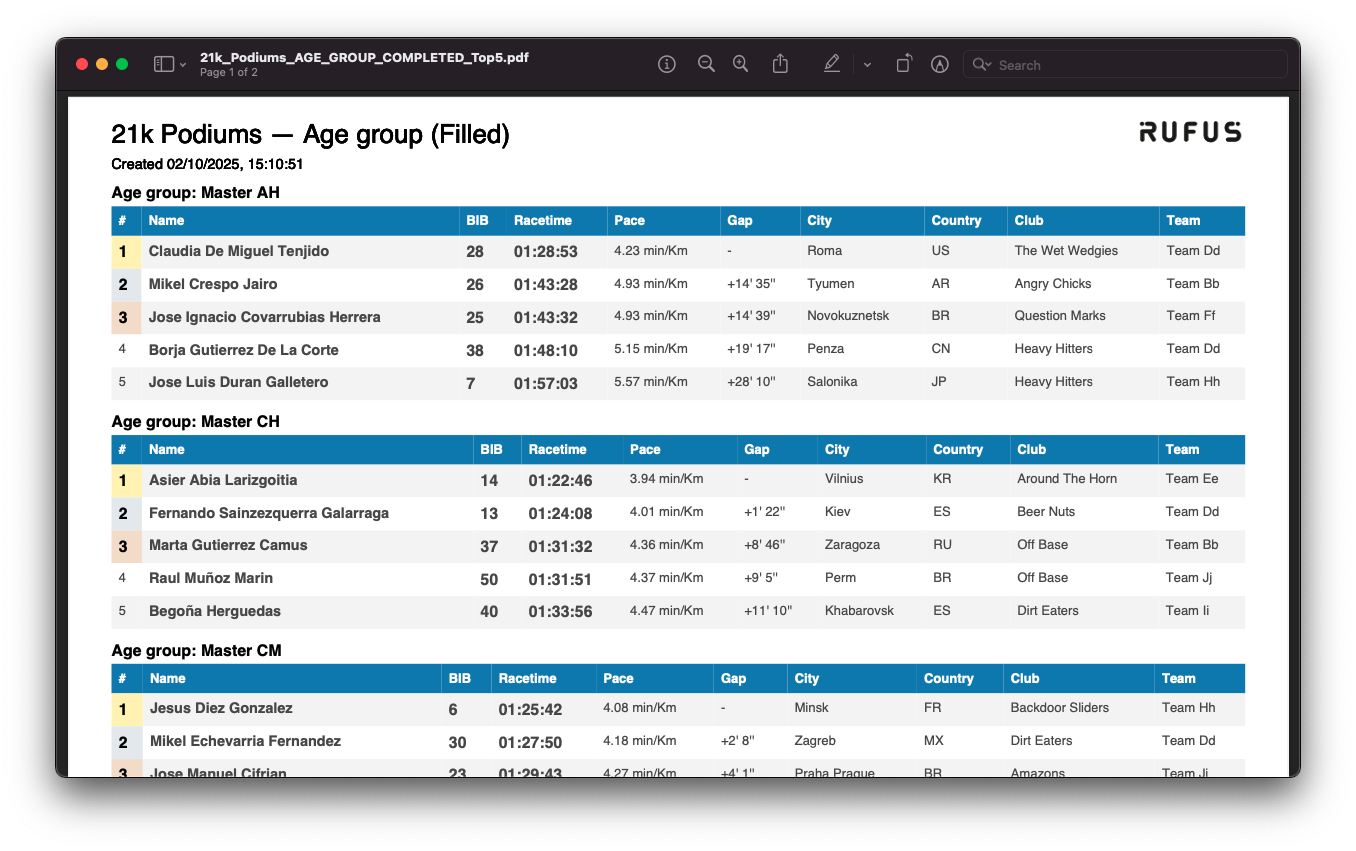
Exports are available in **PDF** for immediate ceremony printing. The exported PDFs are styled for clarity, including race name, category headers, racetime, pace, gap, and participant details.
## Example Exports
Podiums Report
Exports provide clean, professional podium lists with clear formatting. Each podium shows:
* Rank
* Name & Bib
* Racetime
* Pace
* GAP (time difference to first place)
* City, Country
* Club, Team
This makes them ready for both ceremony announcements and public distribution.
## Summary
The **Podiums widget** in RUFUS Race Manager brings clarity and speed to awards handling on race day. With real-time podium tracking, GAP analysis, configurable top positions, and instant exports, race organizers have everything they need to manage podium ceremonies efficiently and professionally.