> For the complete documentation index, see [llms.txt](https://help.runonrufus.com/llms.txt). Markdown versions of documentation pages are available by appending `.md` to page URLs; this page is available as [Markdown](https://help.runonrufus.com/rufus-cloudbox/interface/test-interface.md).

# Test Interface

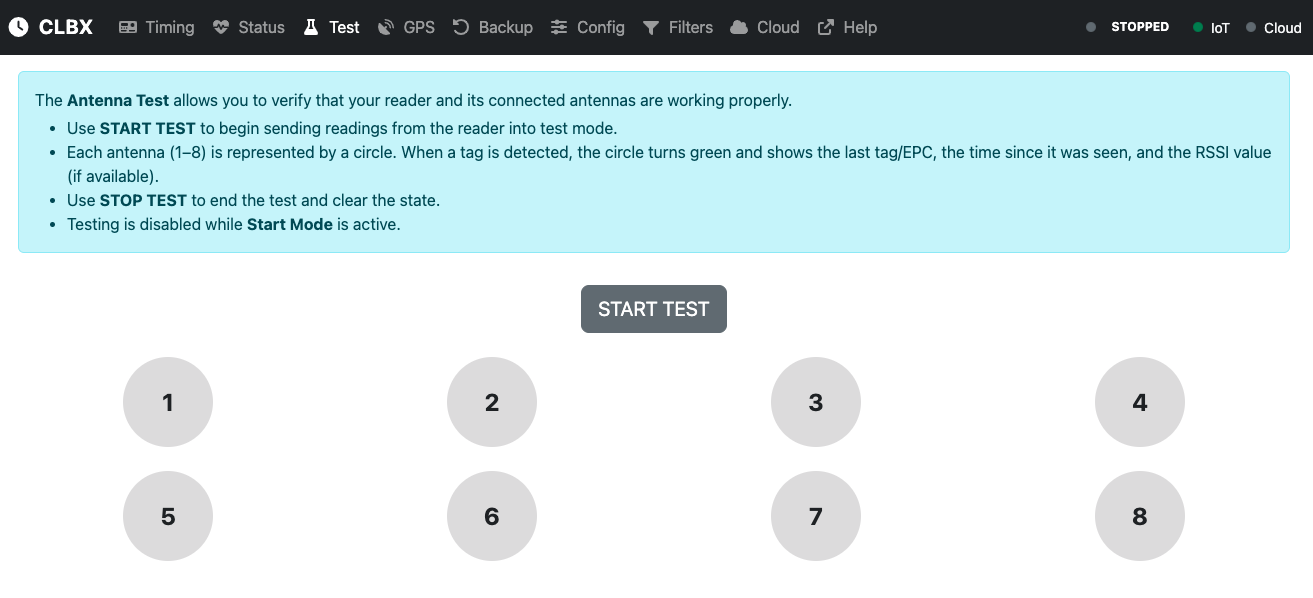
The **Test Interface** in the CloudBox allows you to quickly verify that your RFID reader and its connected antennas are working correctly. This is especially useful during setup or troubleshooting, ensuring that each antenna is detecting tags as expected before starting a live timing session.

The interface represents each available antenna (1–8) as a circle on the screen. When a tag is detected, the circle becomes active and displays key information such as the tag’s code or EPC, the time since it was last seen, and the signal strength (RSSI, if available).

Operators can start or stop the test directly from this interface, making it a convenient tool to validate system readiness.
<figure><img src="/files/wNTovj6c8APTu1aVkaNa" alt=""><figcaption></figcaption></figure>

## Where to Learn More

This article provides a general introduction to the Test Interface. For detailed instructions on how to:

* Run an antenna test,
* Interpret the displayed results,
* Use RSSI values for antenna placement,

please refer to the **ADVANCED OPERATIONS** section of the documentation.


---

# Agent Instructions
This documentation is published with GitBook. GitBook is the documentation platform designed so that both humans and AI agents can read, navigate, and reason over technical content effectively. Learn more at gitbook.com.

## Querying This Documentation
If you need additional information that is not directly available in this page, you can query the documentation dynamically by asking a question.

Perform an HTTP GET request on the current page URL with the `ask` query parameter:

```
GET https://help.runonrufus.com/rufus-cloudbox/interface/test-interface.md?ask=<question>
```

The question should be specific, self-contained, and written in natural language.
The response will contain a direct answer to the question and relevant excerpts and sources from the documentation.

Use this mechanism when the answer is not explicitly present in the current page, you need clarification or additional context, or you want to retrieve related documentation sections.
