The Cloud Interface allows you to link (bind) your CloudBox to your Cloud account, enabling seamless cloud-based timing, storage, and remote management. When bound, the CloudBox automatically sends timing passings to the Passing Ingestion Service and can be monitored through the Race Manager Software and you Cloud dashboard.
This interface is divided into two sections: RUFUS Cloud and Cloud Binding.
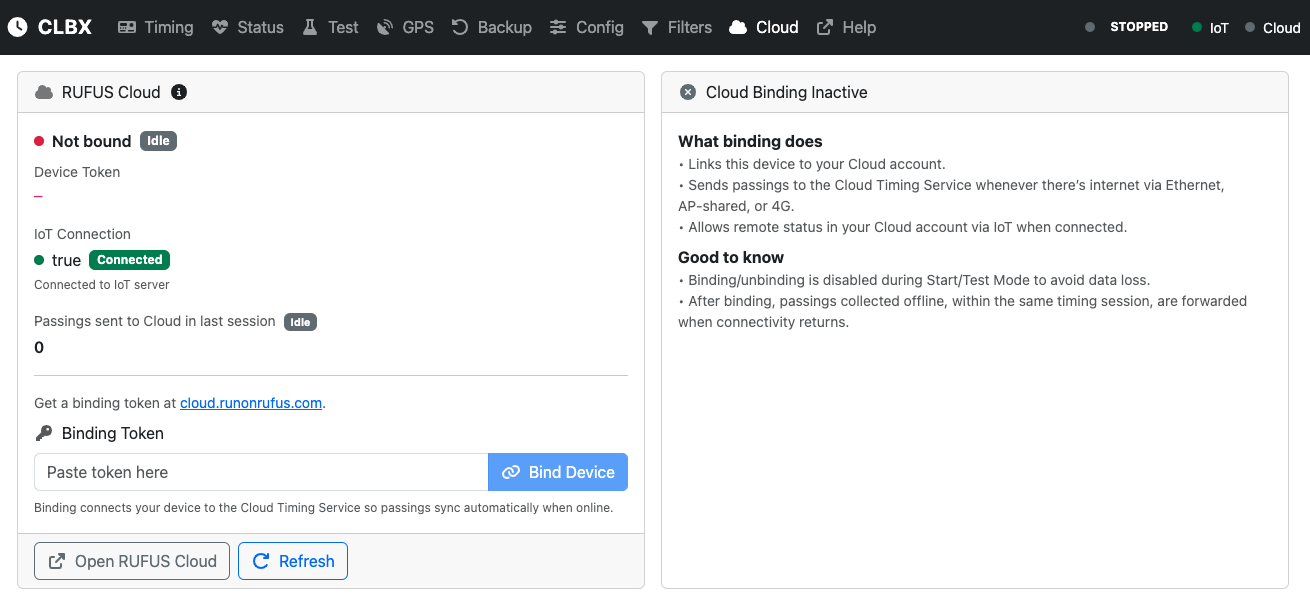
RUFUS Cloud
This section shows the current binding status and IoT connectivity of the device.
Fields
- Binding Status: Indicates whether the CloudBox is bound to a Cloud account. * Not bound (red) → Device is not linked to a Cloud account. * Bound (green) → Device is linked and will actively send passings.
- Device Token: The token generated in your Cloud account for the device.
- IoT Connection: Displays the status of the IoT service (Connected / Disconnected). IoT transmits system health and configuration data to the Cloud every 60 seconds.
- Passings Sent to Cloud (last session): Number of passings successfully uploaded to the Passing Ingestion Service during the last timing session.
- Binding Token Field: Paste the token obtained from cloud.runonrufus.com to bind your device.
- Bind Device Button: Completes the binding process.
Additional actions:
- Open RUFUS Cloud: Opens your Cloud account in a new window.
- Refresh: Updates the current binding and IoT status.
Cloud Binding
This section explains what binding does and provides important notes.
What binding does
- Links this CloudBox to your Cloud account.
- Sends passings to the Cloud Timing Service whenever internet connectivity is available (Ethernet, WiFi AP-shared, or 4G).
- Allows remote monitoring and status checks from your Cloud account via IoT.
Good to know
- Binding/unbinding is disabled while in Start Mode or Test Mode to avoid data loss.
- Passings collected offline are forwarded to the Cloud as soon as connectivity returns (within the same session).
- Unbinding only prevents future uploads — previously sent data remains stored in your Cloud account.
Binding Your CloudBox
- Log into your Cloud account at cloud.runonrufus.com.
- Generate a binding token from the Devices section.
- Paste the token into the Binding Token field in the Cloud interface.
- Click Bind Device.
Once bound, the CloudBox will automatically send passings to the Cloud whenever an internet connection is available.
Unbinding Your CloudBox
- Access the Cloud Interface in the CloudBox dashboard.
- Click Unbind Device.
The device will be disconnected from your Cloud account, disabling cloud-based race management.
Summary
The Cloud Interface links the CloudBox to the Cloud ecosystem, unlocking powerful remote management and secure data storage features. By binding your device, you ensure:
- Automatic upload of all passings to the Passing Ingestion Service.
- Remote monitoring through IoT integration.
- Centralized race management in the Race Manager Software.
Binding and unbinding is straightforward, but should be managed carefully to guarantee uninterrupted synchronization and reliable event timing.