The GPS Interface in the CloudBox provides real-time location and movement information, as well as details of the last known GPS fix. This interface is especially important for mobile or geographically distributed events such as marathons, triathlons, or cycling races.
The interface is divided into several sections: GPS Status, Last Known Position, Movement, and Timing.
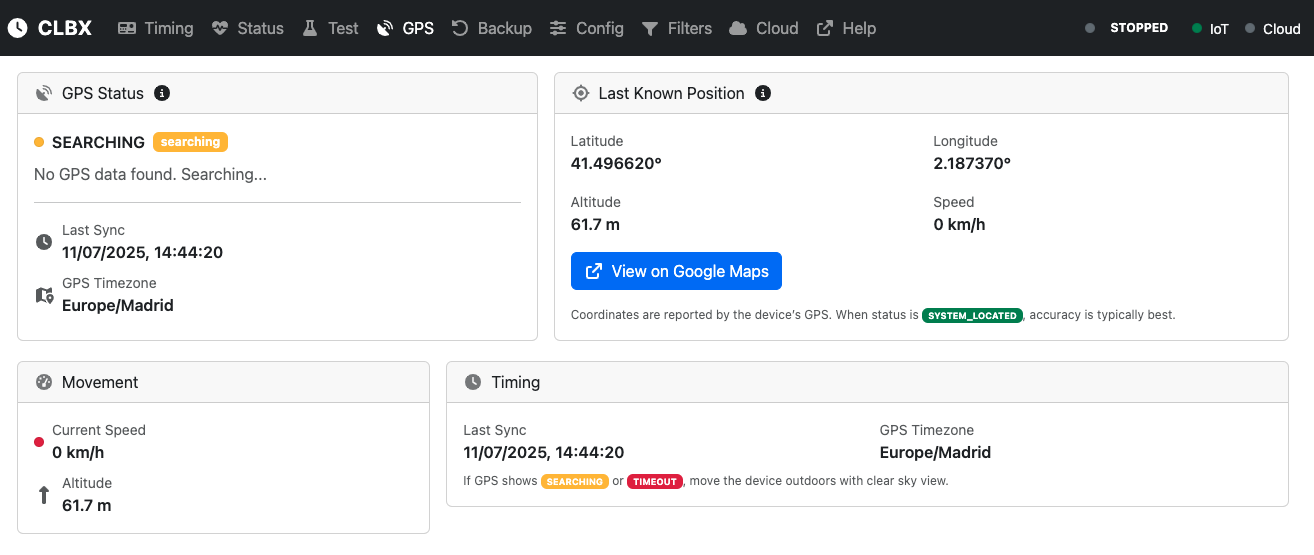
GPS Status
This section shows the current status of the GPS module.
Fields
- Current Status: Displays whether the GPS has acquired a position. Possible values include: * SEARCHING: No GPS fix yet; the system is scanning for satellites. * SYSTEM_LOCATED: A valid GPS fix has been obtained; accuracy is typically best. * TIMEOUT: GPS search exceeded the retry limit. * GPS_ERROR: Invalid or corrupted GPS data.
- Message: Provides additional context, such as “No GPS data found. Searching...”
- Last Sync: Timestamp of the most recent GPS update.
- GPS Timezone: Timezone reported by the GPS module.
Last Known Position
This section provides the geographic details of the last successful GPS fix.
Fields
- Latitude / Longitude: Exact coordinates of the CloudBox.
- Altitude: Elevation above sea level, in meters.
- Speed: Movement speed in km/h. Will show 0 km/h if stationary.
- View on Google Maps: A direct link to visualize the CloudBox’s position in Google Maps.
Movement
This section highlights the current motion data from the GPS module.
Fields
- Current Speed: Current speed of the CloudBox, in km/h.
- Altitude: Current elevation in meters.
Useful for mobile deployments where the CloudBox is moving along with the race.
Timing
This section focuses on time synchronization through GPS.
Fields
- Last Sync: Timestamp of the most recent GPS sync.
- GPS Timezone: Timezone based on GPS data.
- Notes: If the GPS status shows SEARCHING or TIMEOUT, move the CloudBox outdoors with clear sky visibility to improve satellite acquisition.
How the GPS Interface Works
- Real-Time Status: The GPS module constantly attempts to acquire satellites. When located, the interface updates live with coordinates, speed, and altitude.
- Historical Data: Even if GPS temporarily loses connection, the “Last Known Position” remains available.
- Google Maps Integration: Clicking the Google Maps link opens the CloudBox’s coordinates for easy visualization and verification.
Summary
The GPS Interface ensures accurate geographic and timing data for CloudBox operations. With real-time GPS status, last known position details, motion metrics, and direct Google Maps integration, it allows race organizers to confidently monitor the CloudBox’s position and synchronization during events.