The Cross-Reference Table is a feature designed for Open systems—setups where your CloudBox reads not only RUFUS chips but any EPC (Electronic Product Code). With this tool, you can directly map raw EPC codes to bib numbers, giving you precise control over how passings are recognized and classified.

How It Works
Every RFID tag has a unique EPC, which may not be tied to your event’s bib numbering by default. The Cross-Reference Table acts as a dictionary: whenever the CloudBox reads a chip, it looks up the EPC in the table and translates it into the correct bib number.
This ensures that regardless of the raw EPC format, the resulting timing data always aligns with the bib numbers in your event.
Creating a Table
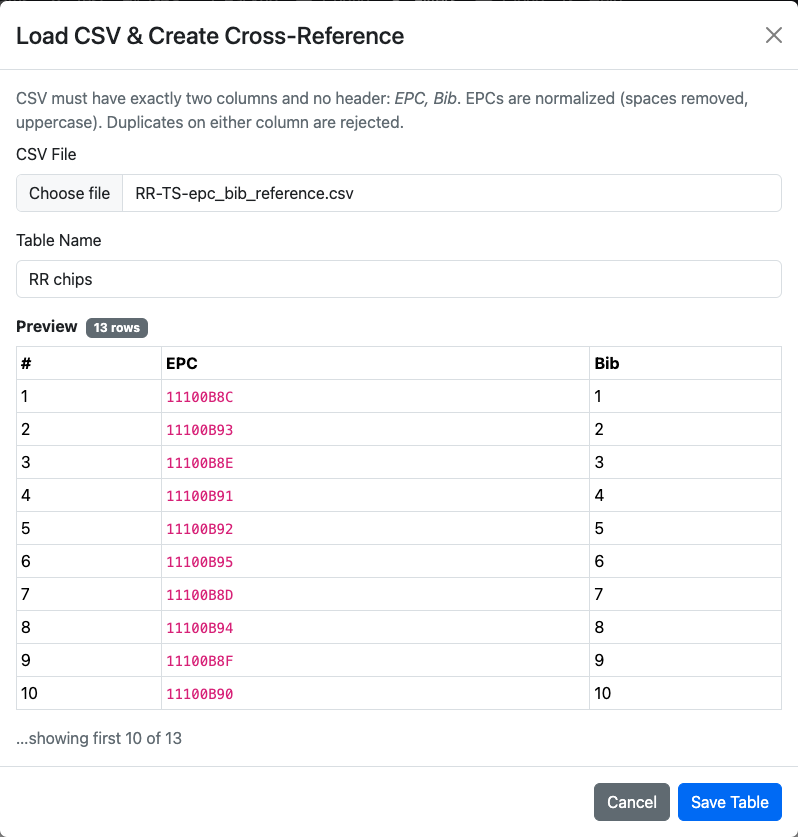
- Prepare a CSV file Your file must contain exactly two columns with no header row: * Column 1: EPC * Column 2: Bib Example (EPCs are automatically normalized: uppercase, no spaces): 11100B8C,1 11100B93,2 11100B8E,3
- Upload and name your table * Click Load CSV & Create Table. * Select your CSV file. * Provide a descriptive table name (e.g. *RR chips*).
- Inspect and Save * The system will preview your data so you can confirm correctness. * Save the table to make it available for use.
Managing Tables
- Enable: Only one Cross-Reference Table can be active at a time. When enabled, it overrides all other EPC-to-bib mappings.
- Inspect: Review the contents of the table at any time.
- Delete: Remove a table when it’s no longer needed.
Each entry in the table must be unique—duplicate EPCs or duplicate bibs are not allowed.
Example Scenario
Imagine you are timing a race with rental chips from different suppliers. Each tag has an unfamiliar EPC like 11100B91, 11100B92, and so on. By loading a Cross-Reference Table that maps these EPCs to bibs 4, 5, 6, the CloudBox ensures that every detection automatically translates into the correct athlete bib number.
Why Use a Cross-Reference Table?
- Flexibility: Integrate third-party chips and rental stock seamlessly.
- Accuracy: Guarantee that EPC reads always match your official bib list.
- Compatibility: Expand your system to support events beyond RUFUS native chips.
Closing Thoughts
The Cross-Reference Table is the bridge between raw RFID data and meaningful race results. In Open systems, where EPCs come from a variety of tags, this feature ensures that every athlete is properly recognized. Combined with Bib Filters, you gain full command of which athletes are tracked and how their chip data is processed, no matter the source.