The Results View, shown as the Leaderboards tab in RUFUS Events App, allows participants, spectators, clubs, teams, and organizers to follow published race results.
This view provides rankings, finish times, race status, filters, search tools, and access to personalized athlete result pages. During live events, results can update automatically when new data is published, without requiring visitors to manually refresh the page.
Key Features of the Leaderboards View
Race Selection
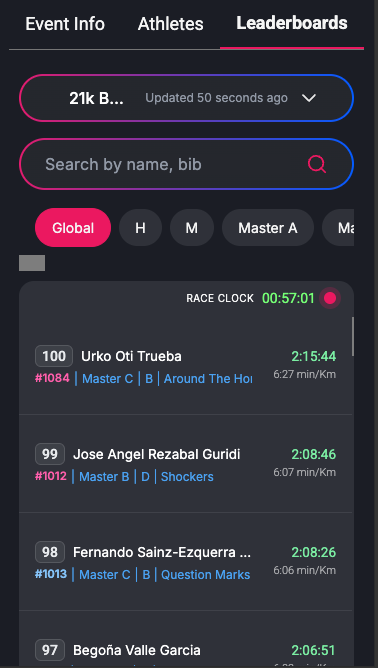
When an event includes multiple races, visitors can switch between races using the race selector.
This allows results to be filtered by race, making it easier to follow events with several distances, categories, or race formats.
Search Functionality
Visitors can search for athletes by name or bib number.
This helps participants find their own result quickly and allows spectators, clubs, and teams to look up specific athletes.
Ranking Filters
The Leaderboards View can include ranking filters depending on the event configuration.
These filters may include:
- Global ranking
- Gender ranking
- Age groups
- Categories
- Clubs
- Teams
- Groups
- Other configured classifications
The available filters depend on the race setup and the classifications published from RUFUS Race Manager.
Results List
The results list displays the published ranking information for the selected race and filter.
Depending on the event configuration, each athlete row may include:
- Position
- Bib number
- Athlete name
- Country
- Race category
- Gender
- Club
- Team
- Race status
- Last checkpoint or finish location
- Finish time
- Gap from the leader
- Pace or speed, when available
Finish times are highlighted to make results easier to read during live and post-race browsing.
Race Clock
When the selected race is live, the Leaderboards View may display the race clock.
The race clock helps visitors understand the current race time while results are still being updated.
Live-only indicators are shown only while the race is actively live.
Automatic Updates
The Leaderboards View can update automatically while visitors are viewing the event.
When new results are published from RUFUS Race Manager, RUFUS Events App can refresh the visible rankings and athlete information without requiring a full page reload.
This creates a more live experience for visitors following results from their phone, tablet, or computer.
Personalized Athlete Result Pages
Visitors can open an athlete result page from the Leaderboards View.
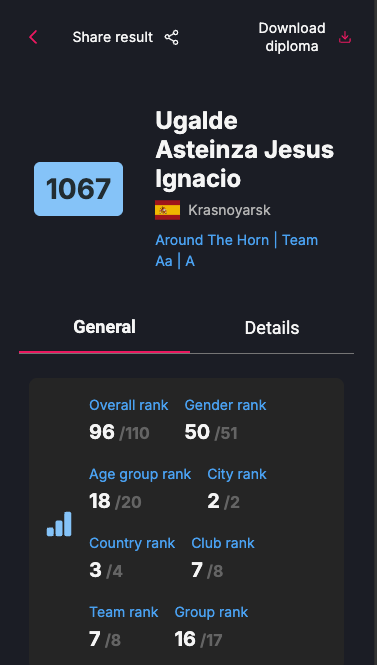
The personalized result page provides a detailed summary of the athlete’s race performance.
Depending on the event configuration, it may include:
- Overall rank
- Gender rank
- Age group rank
- Country rank
- City rank
- Club rank
- Team rank
- Group rank
- Race time
- Pace or speed
- Checkpoint details
- Final result status
Share Result
Athletes and visitors can share personalized result pages directly from RUFUS Events App.
This allows participants to share their race achievement with friends, family, clubs, teams, and social networks.
Download Diploma
When diplomas are available for the event, athletes can download their personalized diploma from the athlete result page.
Diploma availability depends on the event configuration and publication settings.
How to Use the Leaderboards View
- Open the event in RUFUS Events App.
- Navigate to the Leaderboards tab.
- Select the race you want to view.
- Use the search bar to find an athlete by name or bib number.
- Apply ranking filters such as Global, gender, age group, category, club, team, or group when available.
- Select an athlete result to open the personalized result page.
- Share the result or download the diploma when these options are available.
When the Leaderboards View is Available
The Leaderboards View is shown when the selected race has published finished results.
If a race has published progress data but no finished results yet, the app may show Race Progress instead.
This allows visitors to follow the race live before the final leaderboard is available.
Benefits of the Leaderboards View
The Leaderboards View helps:
- Participants find their result quickly.
- Spectators follow rankings during and after the race.
- Clubs and teams review athlete performance.
- Organizers provide a public results destination.
- Visitors access detailed athlete result pages.
- Athletes share their result and download diplomas when available.
The Leaderboards View provides a clear and efficient way to access race results, follow rankings, and continue the event experience after the finish line.