The Athlete's Detailed Results View in the RUFUS Event App provides in-depth insights into an athlete’s race performance. By selecting an athlete from the Results View, users can access a breakdown of rankings, timing splits, and performance metrics.
Key Features of the Detailed Results View
General Tab
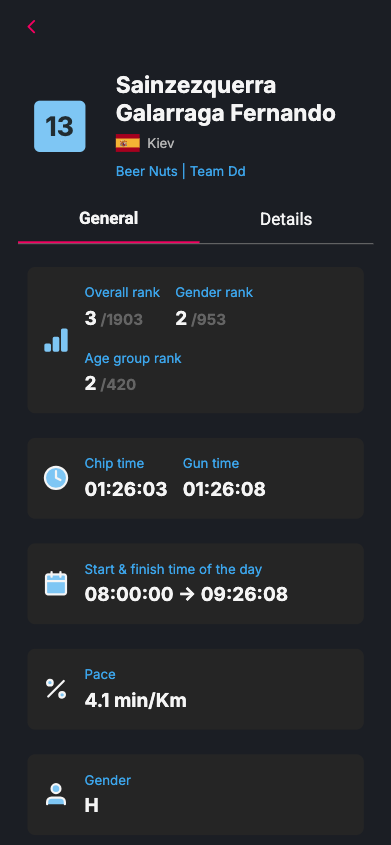
- Athlete Information – Displays the athlete’s name, bib number, nationality (with a flag), and team affiliation.
- Overall Ranking – Shows the athlete’s placement among all participants.
- Gender Ranking – Displays the athlete’s ranking within their gender category.
- Age Group Ranking – Indicates the athlete’s placement within their specific age category.
- Chip Time vs Gun Time – Provides both the net time (from when the athlete crossed the start line) and the official gun time.
- Start & Finish Time of the Day – Shows the exact timestamps of when the athlete started and finished the race.
- Pace – Displays the athlete’s average pace per kilometer or mile.
- Gender – Indicates the athlete’s gender category.
Details Tab
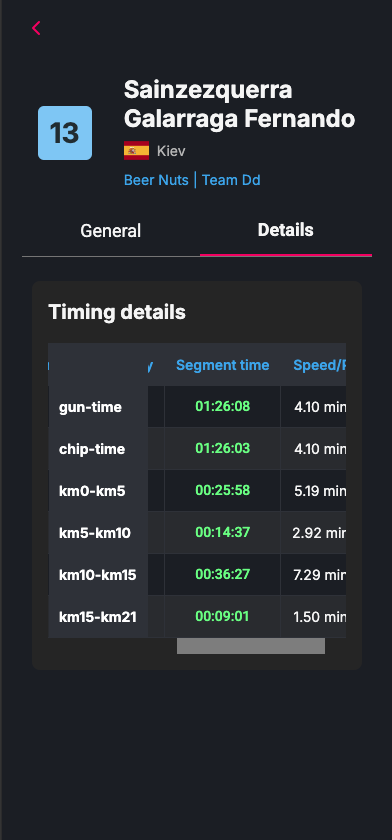
- Timing Splits – Breaks down the race into different segments, showing: * Start and Finish Time of Each Split * Segment Time – Time taken to complete each race section. * Speed/Pace – The athlete’s speed or pace per kilometer/mile in each segment.
How to Access the Detailed Results View
- Navigate to the Results View in the RUFUS Event App.
- Select an athlete from the rankings list.
- View the General tab for rankings and overall race performance.
- Switch to the Details tab to analyze segment splits and pace data.
The Athlete’s Detailed Results View enhances post-race analysis, allowing participants, spectators, and coaches to review performance metrics and compare race splits for better race evaluation.