The Race App integrates directly with RUFUS Race Manager and behaves like a Cloud-connected device.
Device Assignment in RRM
After launching the Race App in Cloud:
- Open the event in Race Manager.
- Go to Devices.
- Assign the Race App device to: * The event * One or more checkpoint(s)
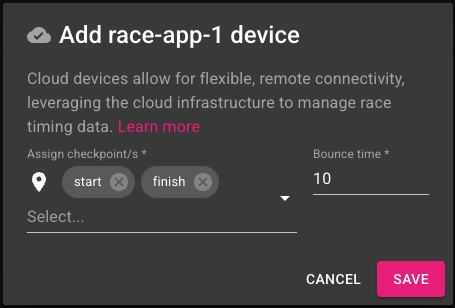
Once assigned, the Race App becomes operational.
How Data Appears in RRM
Manual Timing:
- Appears as checkpoint passings.
Penalty & Bonus:
- Appears in Race Notifications.
- Modifies participant results.
Race Alerts:
- Appears in Race Notifications.
- Informational only.
Team Chat:
- Appears in Race Notifications chat panel.
All actions are append-only for traceability.
Operational Flow
- Judge sends action from Race App.
- RRM receives notification.
- Race Control reviews.
- Classification updates (if applicable).
Cloud manages access and sessions. RRM manages race operations.
Summary
The Race App acts as a field extension of Race Manager, enabling judges to interact with race operations in real time while preserving full audit visibility.