The Team Chat view provides a shared event communication room between judges and Race Control.
It is designed for operational coordination during race day.
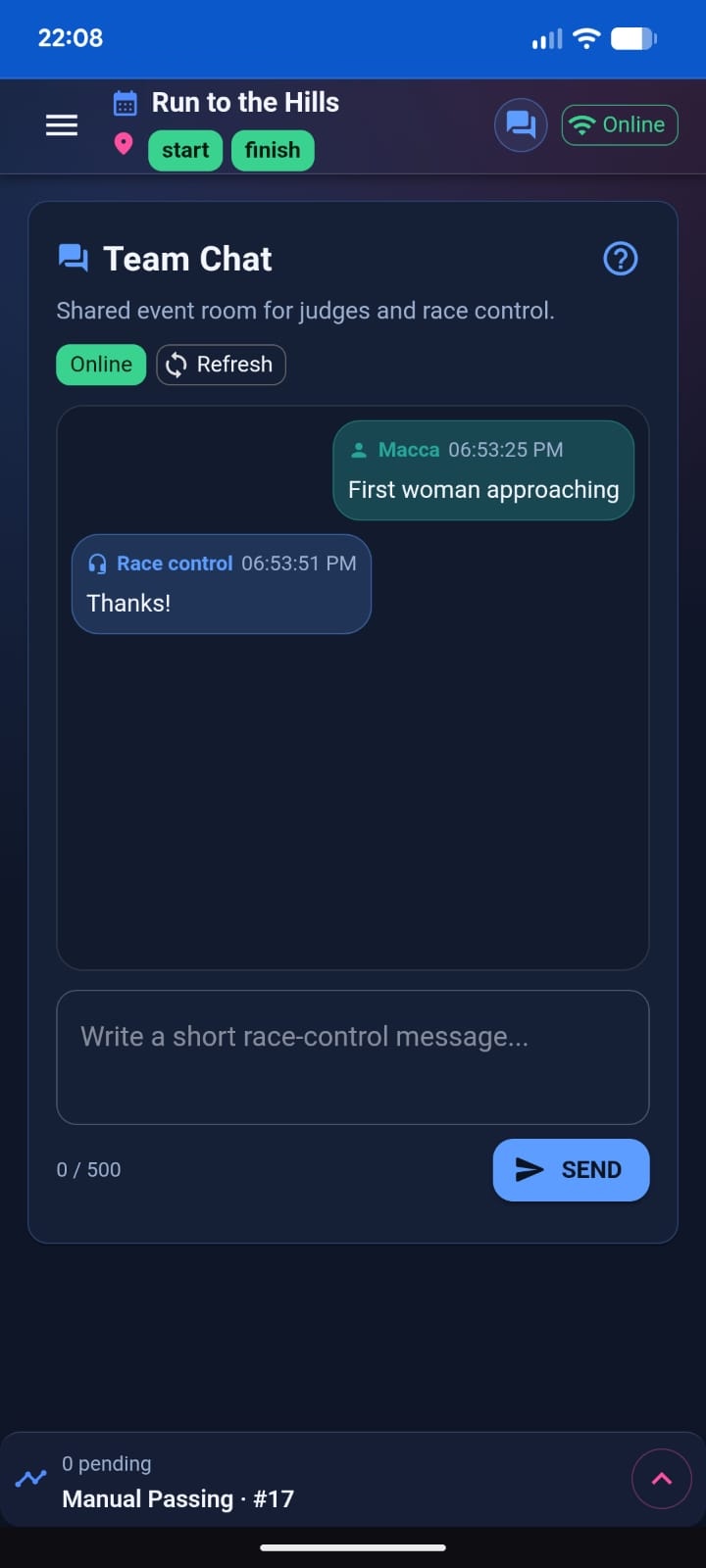
What Team Chat Does
Team Chat allows real-time messaging between:
- Judges using the Race App
- Race Control inside Race Manager
It is separate from Live Activity and maintains its own message feed.
Chat Behavior
Team Chat:
- Polls periodically for updates
- Refreshes immediately when focused
- Updates instantly after sending a message
- Persists across judge logins using the same token
If a judge logs out and another logs in with the same token:
- Chat history remains available.
Sending Messages
Messages should be:
- Short
- Clear
- Operational
Example:
- “First woman approaching finish.”
- “Bib 245 collapsed near km 3.”
- “Checkpoint water running low.”
Avoid long explanations. Use Race Alerts for formal reporting.
Operational Best Practices
- Mention checkpoint context when multiple checkpoints are assigned.
- Use precise language (what / where / when).
- Keep communication concise.
- Do not rely on Chat for classification decisions — use Penalty & Bonus instead.
Summary
Team Chat enables fast, informal coordination between judges and Race Control, complementing structured tools like Race Alerts and Penalty & Bonus.