The Penalty & Bonus view allows judges to apply time adjustments or status changes to participants during race operations. All actions are synchronized with RUFUS Race Manager (RRM) and remain fully audit-visible.
This view is used when Race Control needs to modify classification or participant status based on official decisions.
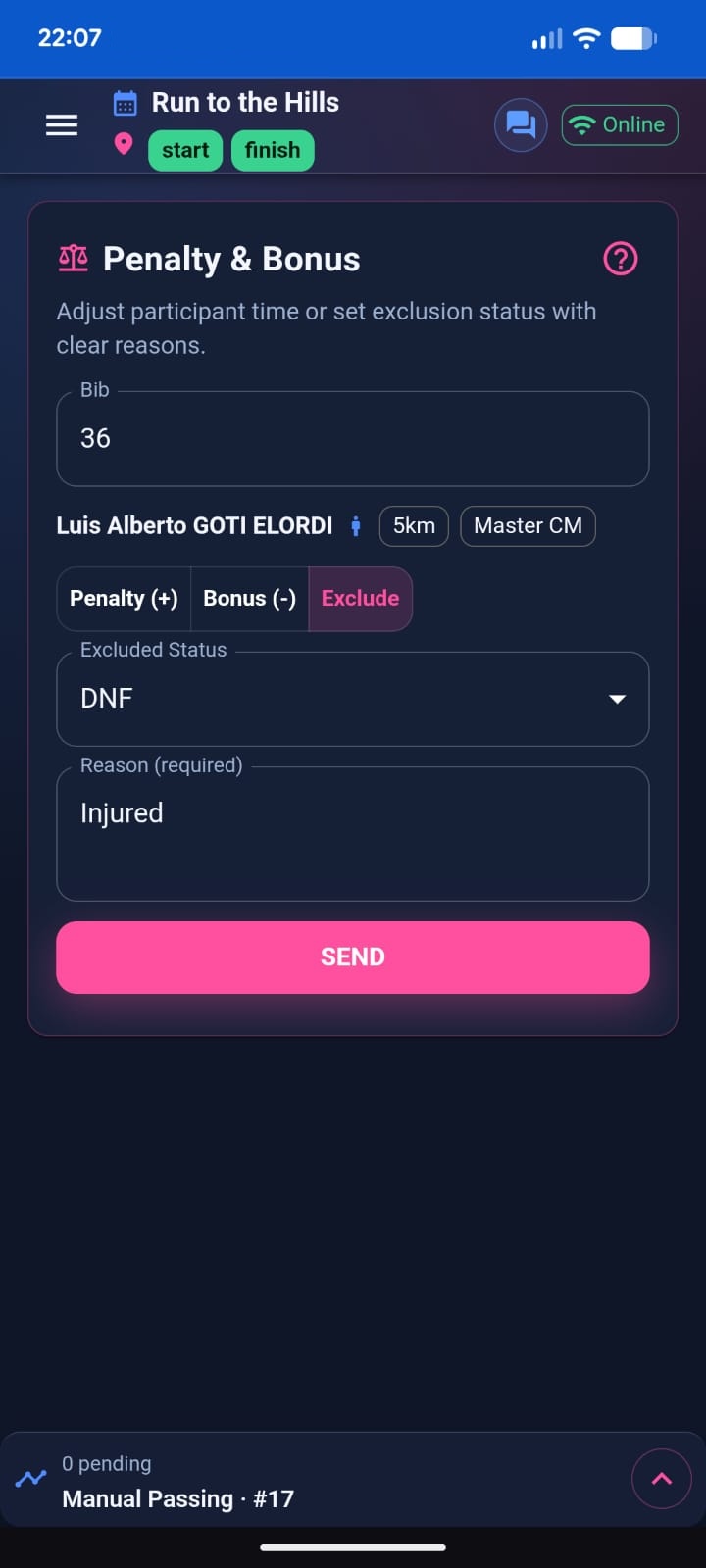
What Penalty & Bonus Does
The Penalty & Bonus module sends race actions that directly affect participant results.
It allows judges to:
- Add time (Penalty)
- Subtract time (Bonus)
- Change participant status (DNS, DNF, DSQ, DNQ)
These actions are recorded as Race App actions and are visible in the Race Notifications panel inside Race Manager.
Selecting a Participant
To apply an action:
- Enter the bib number.
- Confirm the participant preview.
- Choose the desired action mode.
The participant preview shows:
- Name
- Race distance
- Category
Always verify the correct athlete before sending.
Applying a Penalty
A Penalty adds seconds to the participant’s time.
Steps:
- Select Penalty (+).
- Enter the number of seconds.
- Add a clear reason.
- Press Send.
Best practice:
Always include a specific reason. This is audit-visible inside Race Manager and may be reviewed post-race.
Example reasons:
- Drafting violation
- Missed checkpoint
- False start
- Penalty box
Applying a Bonus
A Bonus subtracts seconds from the participant’s time.
Steps:
- Select Bonus (-).
- Enter the number of seconds.
- Add a reason.
- Press Send.
Bonuses should be used only when authorized by Race Control.
Status Changes (Exclusion)
The Exclude mode allows you to change a participant’s status:
- DNS (Did Not Start)
- DNF (Did Not Finish)
- DSQ (Disqualified)
- DNQ (Did Not Qualify)
Status changes modify classification and are immediately visible in Race Manager.
Always provide a clear and descriptive reason for traceability.
Live Activity Integration
All Penalty & Bonus actions appear in Live Activity, showing:
- Participant
- Action type
- Seconds applied (if applicable)
- Reason
- Sending status
Statuses:
- Pending
- Sending
- Sent
- Failed
If offline, actions queue and sync automatically once connectivity returns.
Audit and Traceability
Penalty & Bonus actions are:
- Append-only
- Logged at Cloud level
- Visible in Race Manager
- Linked to the judge name used at login
This ensures full operational accountability.
Operational Best Practices
- Confirm bib before applying changes.
- Always include detailed reasons.
- Coordinate via Team Chat before applying major status changes.
- Monitor Live Activity to ensure actions are Sent.
- Avoid duplicate submissions.
Summary
Penalty & Bonus allows controlled and traceable participant time adjustments and status changes directly from the field. Every action is synchronized with Race Control and recorded for audit and post-race review.